Telemedicine kiosk for rural healthcare
Connect local patients to remote doctors while capturing screening data closer to the community.
A connected telemedicine health kiosk for secure doctor video consultation, patient registration, optional diagnostic screening, digital records and remote-care workflows - designed for rural healthcare, PHCs, CSR programmes, pharmacies, corporates and government projects.
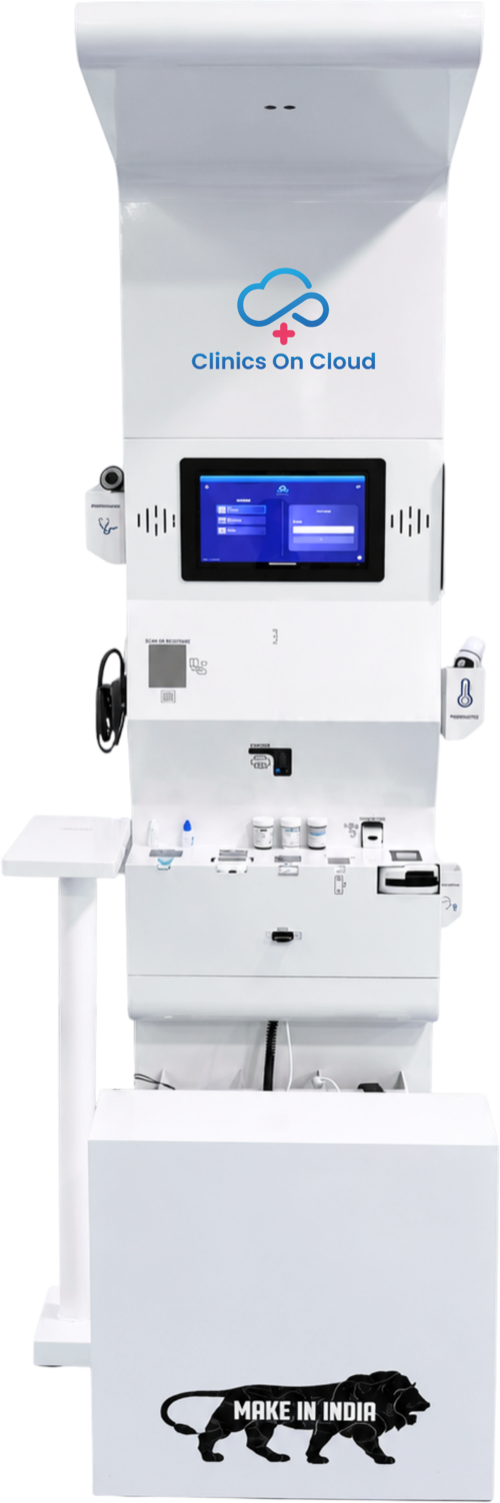
A telemedicine kiosk, also called a telehealth kiosk, video consultation kiosk or remote consultation kiosk, is a physical care point where patients can register, connect to a remote doctor and - if devices are integrated - share measured vitals or diagnostic screening results during the consultation.
The kiosk creates a structured patient journey so remote consultation is supported by identity, records and - where available - objective health measurements.
The software layer should connect patient registration, consultation, screening data, records and follow-up.
The equipment mix should match the intended clinical scope rather than loading every possible device into one kiosk.
Live consultation requires stable internet bandwidth, while registration, local screening and queued data can be designed for offline-first operation. Exact bandwidth requirements depend on video resolution, software, number of simultaneous sessions and network architecture.
Wi-Fi, Ethernet or 4G/5G depending on the site.
Secondary connectivity is useful for mission-critical sites.
Store registration and screening data locally where configured.
Upload queued records when connectivity returns.
Connect local patients to remote doctors while capturing screening data closer to the community.
Support remote specialist access, screening and referral workflows within a primary-care setting.
Deploy connected care points across underserved locations and track programme reach, consultations and referrals.
Give employees convenient doctor access alongside routine vitals and preventive-health services.
Create a remote-consultation point within suitable pharmacy environments, subject to the applicable operating and regulatory model.
Clinics On Cloud is based in Pune, Maharashtra and can support telemedicine-kiosk deployments across the state and beyond.
ABDM-ready workflows can support health identity and interoperable records. eSanjeevani integration should only be presented as live after the required technical access, programme permissions and government approvals are confirmed.
Design patient identity, consent and record workflows around approved ABDM architecture and project requirements.
Evaluate integration only after confirming APIs, programme permissions, security requirements and deployment approval.
Clinical consultation, identity, consent, documentation and prescription workflows should follow the applicable Indian telemedicine framework and authorised medical practice.
| Requirement | Telemedicine Kiosk | Teleconsultation App |
|---|---|---|
| Physical care point | Yes | No |
| Shared community access | Designed for multiple patients | Primarily personal-device based |
| Diagnostic devices | Can be integrated | Usually depends on external home devices |
| Operator assistance | Can be available | Usually patient self-managed |
| Connectivity resilience | Can support managed network and offline workflows | Depends on user's device/network |
| Best fit | PHCs, villages, pharmacies, workplaces, CSR sites | Individual remote consultation |
Extend consultations to locations where a doctor is not physically present.
Give remote doctors measured vitals when diagnostic devices are integrated.
Use consistent registration, consultation, documentation and referral steps.
Connect multiple distributed care points to a central pool of doctors.
Maintain longitudinal consultation and screening records where authorised.
Measure consultations, coverage, referrals and operational utilisation.
A basic consultation kiosk and a fully equipped telemedicine health kiosk are very different products. Final cost depends on enclosure, computer/touchscreen, camera/audio system, software, diagnostic devices, connectivity, ABDM/EMR integration, branding, installation and support.
Share whether you need consultation only, basic vitals, advanced diagnostics, government integration or a multi-site network.
Hardware + software + integration + supportClinics On Cloud can combine kiosk hardware, connected screening devices, telemedicine software, digital reports, APIs, deployment and service support. For Maharashtra projects, the company operates from Pune and can support institutional deployments across the state.
Kiosk enclosure, touchscreen, camera and audio system.
Optional connected vitals and medical devices.
Teleconsultation, records, analytics and integrations.
Installation, training, AMC and remote technical support.
Do not assume one standard configuration satisfies every state, PHC or public-health tender.
Map hardware, software, devices, network, integrations and certifications against each tender requirement.
Confirm doctor model, operating hours, escalation, prescription and referral requirements.
Clarify supply-only versus operations, staffing, AMC, uptime and SLA obligations.
Answered by the team at Clinics On Cloud. The same answers they give on the phone.
A telemedicine kiosk is a physical digital healthcare station that connects patients with remote doctors through secure video consultation and can also include screening devices, records and diagnostic tools.
The patient registers, completes any available screening, joins a secure video consultation with a doctor, receives advice and follows the documented referral or follow-up plan.
The terms are often used interchangeably. Telehealth can be broader, while telemedicine usually refers more specifically to clinical consultation and care delivered remotely.
Yes. Blood pressure, SpO₂, temperature, ECG, digital stethoscope and other compatible screening devices can be integrated depending on the clinical scope.
At minimum, a computer or touchscreen, camera, microphone, speaker and telemedicine software are required. Diagnostic devices, printer, scanner, UPS and other equipment are added according to the use case.
Live video requires stable broadband or cellular connectivity. Exact bandwidth depends on software and video quality. A managed backup connection is useful for critical sites.
Live doctor consultation cannot occur without connectivity, but patient registration, screening and local record capture can be designed to continue offline and sync once the network returns.
Yes. They can support screening, remote consultation and referral workflows in primary-care locations, subject to programme design and applicable government requirements.
Potential integration should be confirmed project-by-project because it depends on API access, programme permissions, security requirements and government approval.
It generally refers to telemedicine workflows designed to support approved ABDM identity, consent and interoperable health-record architecture. Exact compliance depends on the implemented modules and certification status.
Cost depends on hardware, software, diagnostic devices, enclosure, integrations, connectivity, branding, installation and support. A configured quotation is the most accurate approach.
Clinics On Cloud is based in Pune, Maharashtra and offers connected Health Kiosk and telemedicine-enabled solutions for institutional projects.
Yes. The recommended demo should cover patient registration, connected vitals, doctor video consultation, record handling and the selected integration workflow.
We started Clinics on Cloud with a simple belief - that the quality of your healthcare should not depend on your postcode. Whether you’re a government, corporate, NGO or entrepreneur - we built this for you.
+91 8999 073 447
Mon - Sat · 9 AM to 6 PM IST
sales@clinicsoncloud.com
Partnerships · Deployments · Support
www.clinicsoncloud.com
Products · Case Studies · News
Nighoje, Chakan MIDC
Pune, Maharashtra - 410501, India